You’ll learn everything from how to get your stream key, what equipment you need, how to set up OBS or TikTok LIVE Studio, plus pro tips to boost your stream’s quality and viewer engagement.
Who Can Stream Games on TikTok?
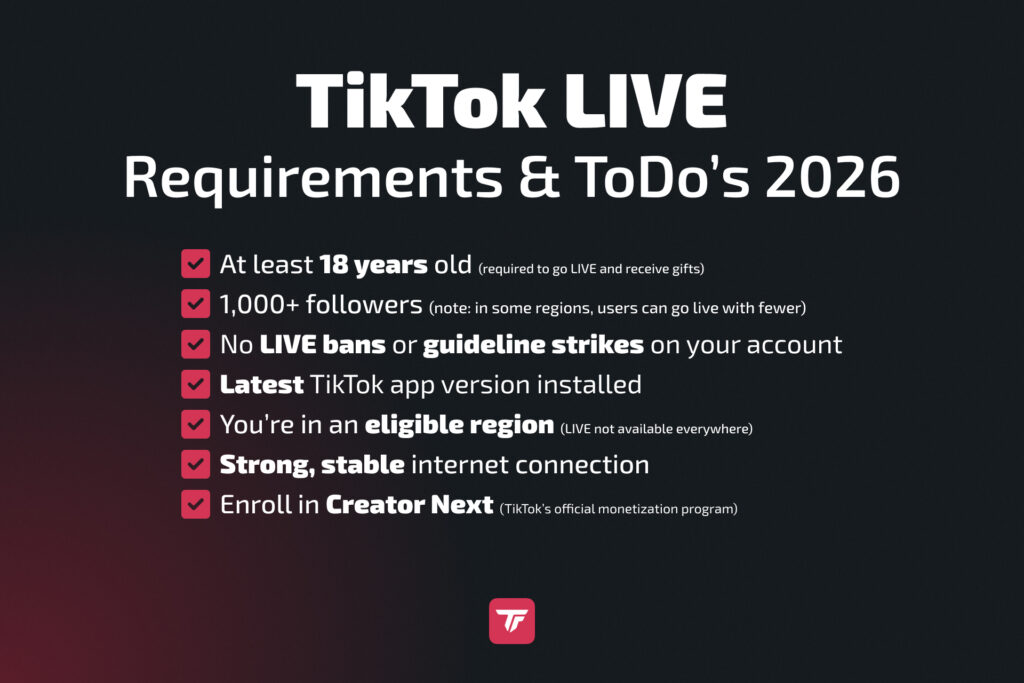
Before you go live, you need to meet some basic requirements:
- Be 18+: Only users aged 18 and older can access TikTok LIVE and receive gifts.
- Have at least 1,000 followers: This is the general requirement, though regional exceptions may apply.
- No active LIVE bans: You must have a clean record with no community guideline violations.
- Use the latest TikTok app version.
- Stable internet connection: Aim for a strong and steady upload speed (minimum 5 Mbps).
✅ Tip: Check out our “How Many Followers on TikTok to Go Live” article for full details.
These rules are in place to protect the quality of live content on TikTok. If you’re just starting out, focus on creating engaging short-form content to grow your audience. Once you cross the 1,000-follower mark, you can unlock LIVE features and start streaming games.
What Is a TikTok Stream Key & How to Get It?
A TikTok Stream Key is a unique code that allows you to connect streaming software (like OBS) to TikTok’s servers. This lets you stream from your PC using overlays, alerts, and widgets.
Why It Matters
Streaming from a PC with OBS gives you full control over your stream’s layout, effects, and interactivity. You can add custom overlays, TikFinity alerts, a webcam, and much more. But to stream from OBS Studio directly, you’ll need a stream key.
Difference from TikTok LIVE Studio
- Stream Key = Needed for OBS or Streamlabs.
- LIVE Studio = TikTok’s official PC streaming tool, no key required, but with fewer customization options.
How to Get a Stream Key
TikTok still limits access to stream keys, but here are ways to try:
Wait for Access: TikTok may grant it based on your activity and growth. Some users find it in the TikTok LIVE Center once their account grows.
Apply via Agency: Agencies like Carter Pulse partner with TikTok to provide stream key access. This option is more reliable for serious creators.
👉 Related: How to Get TikTok Stream Key
No Stream Key? No Worries.
If you don’t have access to your stream key yet, there are a few workarounds available.
You can still go live using TikTok LIVE Studio or the OBS plugin SE.Live.
Want to keep your OBS overlays and still get credit for TikTok challenges? Just use TikTok LIVE Studio as your main broadcasting tool. Add a Capture Card as a source inside TikTok LIVE Studio, then turn on the OBS Virtual Camera and select it as your source in TikTok LIVE Studio to send your OBS scene straight into it.
For a step-by-step guide, check out Stream To TikTok From Desktop Computers.
How to Stream Games on TikTok From PC
Things You’ll Need
- OBS Studio: Free, open-source, best for advanced users. Requires stream key.
- Or TikTok LIVE Studio: TikTok’s own app, perfect for beginners, no stream key needed.
- Hardware:
- Webcam (optional): Helps you connect with viewers visually.
- Microphone: Clear audio improves viewer experience.
- Capture Card: If streaming from console (e.g., PS5, Xbox), you’ll need a capture card like Elgato.
- Webcam (optional): Helps you connect with viewers visually.
- Overlays & Widgets: Add interactivity with TikFinity (likes, gifts, goals).
- Internet: At least 5 Mbps upload for 1080p streaming. For best results, use a wired connection.
Customizing your setup with TikFinity overlays gives your stream a unique touch and encourages viewers to interact.
Step-by-Step OBS Setup
- Download & install OBS Studio from obsproject.com
- Open Settings > Stream
- Choose “Custom” service and paste your TikTok RTMP server URL + stream key (if you don’t have a stream key, use SE.Live)
- Base/Output Resolution: 1080×1920 (portrait)
- Optional: install a vertical plugin (AITUM or SE.Live) if you’re streaming vertically and horizontally
- Add Sources:
- Game Capture: Show your gameplay
- Webcam: Connect with your audience visually
- Microphone: Make sure your voice is clear
- Browser sources: Use links from TikFinity to show overlays
- Game Capture: Show your gameplay
- Test your scene layout and audio (do a quick OBS test recording)
- Click “Start Streaming” when ready and make sure to hit Go LIVE on TikTok (browser or mobile app)
🎯 Pro Tip: Use TikFinity’s Overlay Gallery to add widgets like donation goals, alerts, counters, and more.
Step-by-Step TikTok LIVE Studio Setup
- Download TikTok LIVE Studio for Windows
- Log in with your TikTok account
- Connect your camera and microphone
- Select your Game Source (from desktop or window)
- Customize your layout and overlays
- Add TikFinity widgets:
- Log in to TikFinity and find a widget in the Overlay Gallery
- Copy the widget’s URL
- In LIVE Studio, click “+” under Sources, choose “Link”, and paste URL
- Log in to TikFinity and find a widget in the Overlay Gallery
- Hit “Go Live”
✅ TikFinity adds real-time engagement elements like sound alerts, chat interactions, goals and more.
How to Stream Games on TikTok From Mobile
Using the TikTok App with Screen Share
You can go live directly from your phone using TikTok’s mobile app, which is especially useful for mobile games.
How to Do It:
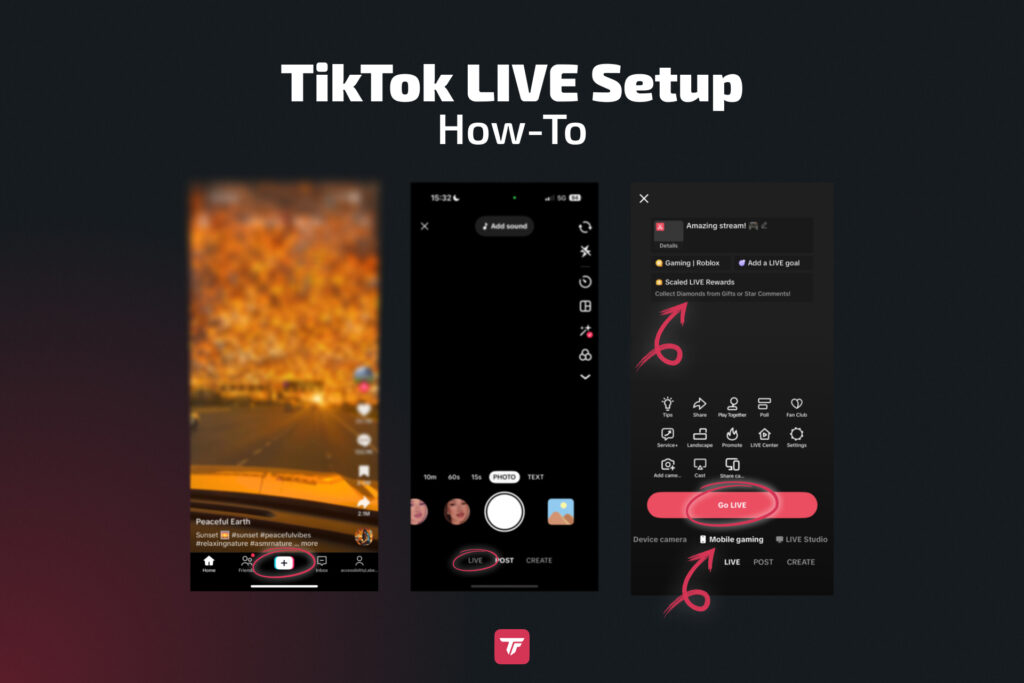
- Open TikTok
- Tap “+”, then swipe to “LIVE”
- Tap “Mobile gaming”
- Add:
- A catchy title (e.g. “1v1s in Fortnite! Come watch!”)
- LIVE category (Gaming)
- A catchy title (e.g. “1v1s in Fortnite! Come watch!”)
- Launch the game, go back to TikTok
- Tap “Go LIVE” and agree to broadcast your screen
💡 Don’t forget to promote your stream beforehand with a TikTok video or story!
Tips for Better Mobile Game Streams
For better mobile game streams, use a tripod or a stable stand to keep your phone steady. Make sure your phone stays charged or plugged in throughout your stream. Stream over WiFi or 5G to ensure smooth and stable video quality, and enable Do Not Disturb mode to avoid any interruptions while you’re live.
🧠 Add TTS (Text to Speech) or Sound Alerts via TikFinity mobile to increase audience participation and hype moments. You can download TikFinity for Android here and for iOS here
TikTok Gaming Monetization: How Creators Earn
TikTok does not pay creators per view like YouTube, but there are several ways to earn income on the platform.
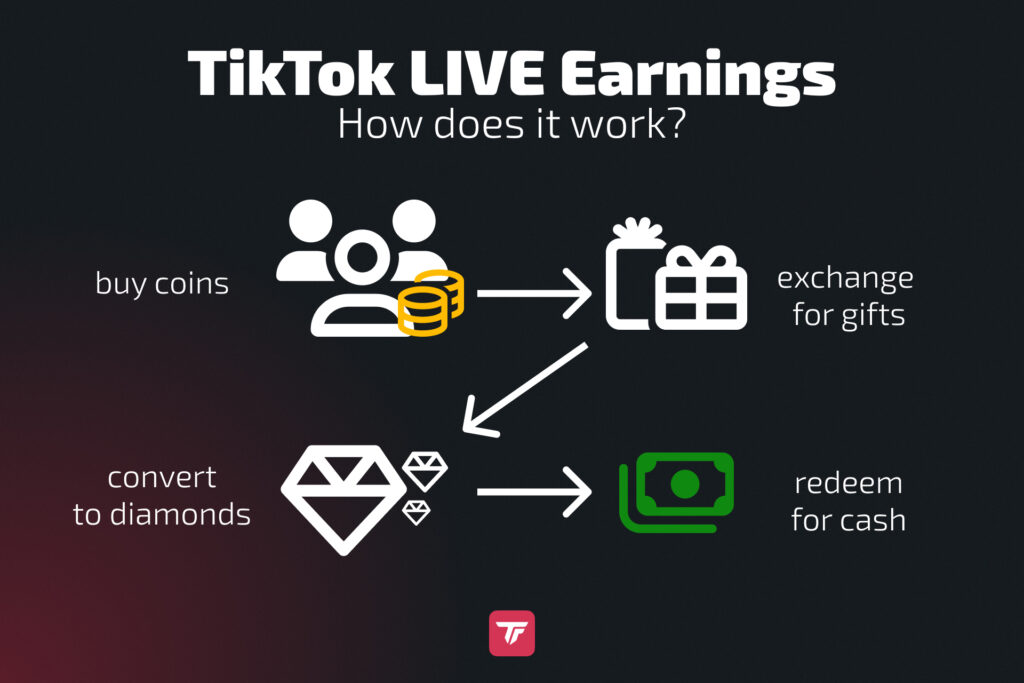
Fans can send gifts during your live streams, which are converted into diamonds that TikTok pays out as real cash.
You can also take advantage of crowdfunding features by setting goals, such as raising funds for a new microphone, hitting 10,000 likes, or running donation drives.
Sponsored streams are another option, allowing you to collaborate with gaming brands and earn through partnerships.
Finally, you can use TikTok to cross-promote your other channels, like Twitch, YouTube, or Discord, helping you grow your audience and revenue opportunities.
🔗 Want to dive deeper? Read our full guide “TikTok Monetization for Gamers“.
Best Games to Stream on TikTok (2026 Trends)
Use TikTokStats.com to track what’s trending. Here are the top-performing games for TikTok LIVE:
- Fortnite: Always a crowd favorite
- PUBG Mobile: Big in Southeast Asia
- Mobile Legends: Bang Bang: Huge viewer base
- Call of Duty Mobile: High-action streams
- Roblox: Popular with younger viewers
- Among Us, Valorant, and seasonal games like Horror Survival in October also trend well.
🎮 Stay authentic. Viewers connect better when you’re genuinely enjoying the game.
Pro Tips to Make Your Gaming Stream Stand Out
Want to grow fast and keep viewers coming back? Start by planning your streams ahead and posting countdown stories to get your audience excited.
During your live session, try fun challenges like “First to comment wins!” or “Guess the score!” to keep everyone engaged.
You can set TikFinity Goals, such as “50 likes = funny filter activated,” to get viewers to participate. You can also make your stream even more engaging by adding interactive overlays that react in real time to likes, shares, and gifts.
Try streaming during busy hours, like 6 to 9 PM local time, to reach more people, but be sure to check your dashboard to see when your viewers are actually online.
Finally, team up with other creators or do quick Q&A sessions during breaks to connect with your audience and keep them coming back.
Final Thoughts
Going LIVE with your gameplay on TikTok is one of the most effective ways to grow your audience, show your personality, and even earn money. With the right setup, and help from tools like TikFinity, you can turn casual viewers into loyal fans.
Don’t wait until everything is “perfect.” Start streaming today, learn as you go, and build your community along the way.
🎯 Try TikFinity for free now and turn your TikTok stream into a full-blown experience.
Game-Specific & Streaming Questions
How to stream Fortnite on TikTok?
To stream Fortnite, you can use OBS or TikTok LIVE Studio. On OBS, capture the Fortnite window, add overlays using TikFinity, and connect via your TikTok stream key. With LIVE Studio, select the Fortnite game source and personalize your stream with TikFinity links. Make sure your setup supports high frame rates for smooth gameplay.
How to stream Roblox on TikTok?
Roblox streaming is simple with either OBS or LIVE Studio. Use game capture to select the Roblox window, then layer in a webcam and microphone. Add interactive widgets like follower goals or sound alerts via TikFinity to make the experience engaging for your audience.
How to stream Mobile Legends: Bang Bang on TikTok?
Mobile Legends can be streamed via mobile screen sharing or through a PC using an Android emulator. For mobile, go to LIVE and Mobile gaming. For mobile, either connect your smartphone to your PC so you can send it into OBS Studio, or capture the Android emulator window in OBS, add overlays, and stream vertically to match TikTok’s aspect ratio.
How to stream PUBG Mobile on TikTok?
You can stream PUBG Mobile through direct screen share on your phone, use an emulator on your PC, or connect your smartphone to your PC. To enhance your stream, include a facecam and TikFinity overlays for real-time alerts and chat engagement.
How to stream Garena Free Fire on TikTok?
Free Fire is ideal for mobile streaming. Use TikTok’s in-app screen share function to show gameplay. Add a good mic for commentary and ensure you have a stable internet connection.
Can I stream from console to TikTok?
Yes, but you’ll need a capture card (e.g., Elgato HD60) to connect your console to a PC. Then, stream using OBS or LIVE Studio. This allows you to include overlays, facecam, and TikFinity engagement features.
Can I stream games on TikTok without a stream key?
Definitely. TikTok LIVE Studio does not require a stream key. Just download the software, log in, and start customizing your layout. It’s perfect for beginners or anyone without access to stream key permissions.
What’s better: OBS or LIVE Studio?
OBS offers unmatched flexibility with plugins, custom scenes, and more settings for your stream. It’s ideal for beginners and experienced streamers. LIVE Studio is more beginner-friendly with a simpler setup. If you’re new to streaming, start with LIVE Studio and move to OBS as you grow.