

Somewhere between holding the camera, keeping the show going, and thanking a gifter, every mobile streamer hits the same wall: chat moves faster than your eyes. TikFinity Mobile’s Text-to-Speech tears that wall down and gives your chat a voice, it reads your viewers’ messages and announces gifts out loud while you stay in the moment.
What TTS does in TikFinity Mobile
Text-to-Speech in the TikFinity mobile app comes in two tabs that work independently: TTS Chat reads what your viewers write, TTS Gifts announces incoming gifts. Each tab has its own voice, its own volume, and its own rules about what gets read.
The free plan includes 75 TTS messages a day, which is plenty to try it on a real stream. New to the app? TikFinity Mobile is free on Google Play and the App Store, and our TikFinity Mobile quick guide walks you through install, login, and connecting your TikTok account. Come back here for the deep dive.
The voice gallery: one library, two picks
Before you set anything up, meet the heart of the feature. TTS Chat and TTS Gifts share the same voice gallery, but each tab picks its own voice independently, so your chat can sound completely different from your gift announcements.
The gallery splits into two groups. Standard voices are free, and you can shape them with three sliders: default speed, default pitch, and volume. Premium AI voices, marked with a crown in the picker, are part of TikFinity Pro and run on a monthly budget of 100,000 credits, enough for a whole lot of talking; they keep the controls simple with volume only. And if a busy month ever burns through your budget, you can top up credits anytime from your profile.
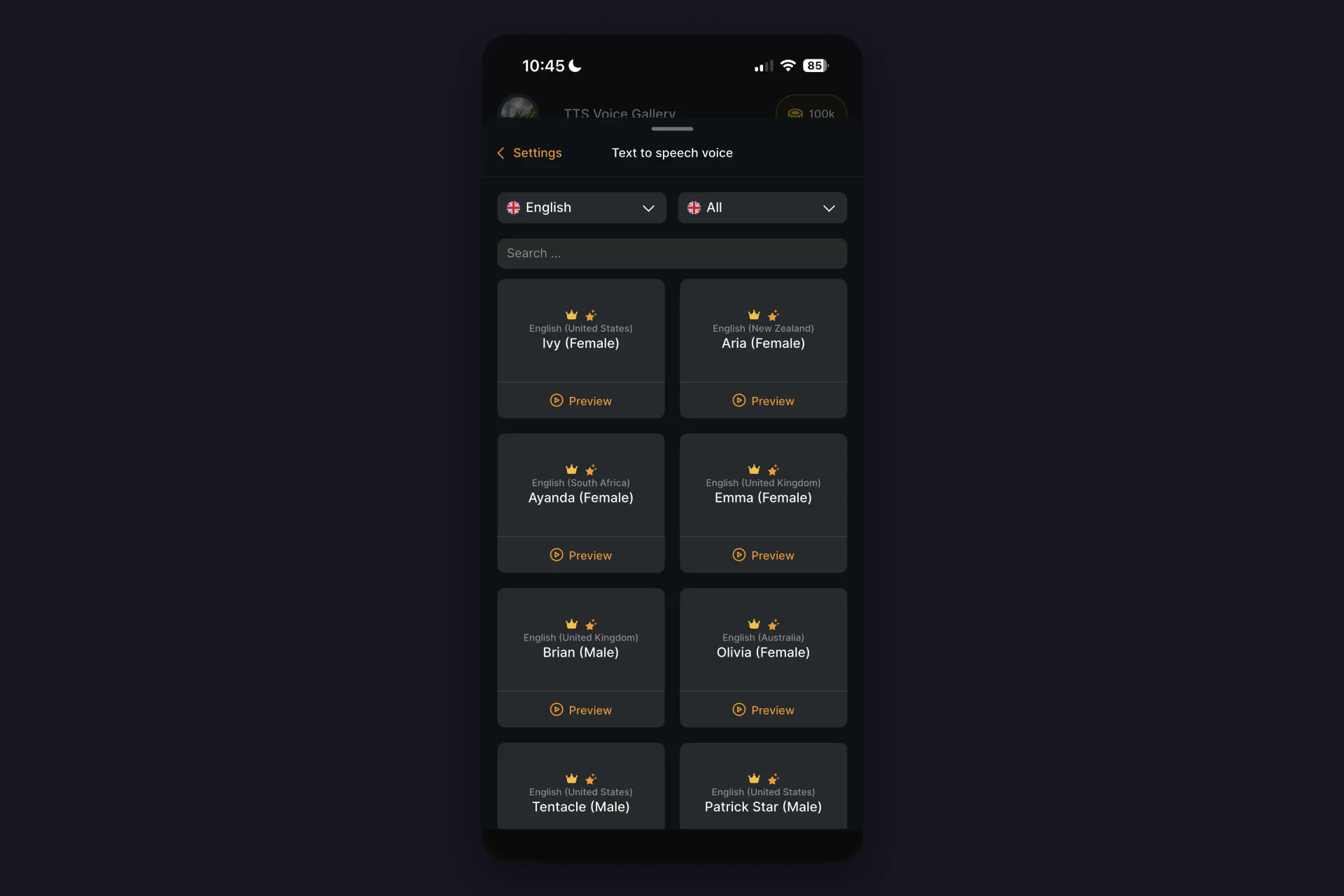
The language range is honestly wild. The gallery covers Arabic, Bengali, Bulgarian, Catalan, Chinese with Mandarin and Cantonese options, Croatian, Czech, Danish, Dutch, English, Finnish, French, German, Greek, Hebrew, Hindi, Hungarian, Icelandic, Indonesian, Italian, Japanese, Kannada, Korean, Malay, Norwegian, Polish, Portuguese, Romanian, Russian, Slovak, Slovenian, Spanish, Swedish, Tamil, Telugu, Thai, Turkish, Ukrainian, Vietnamese, and Welsh.
And every language brings its own set of voices and regional variants. English alone comes in eight flavors: United States, United Kingdom, Australia, Ireland, India, New Zealand, Singapore, and South Africa, each with several voices to preview.
Set up TTS Chat: your viewers, out loud
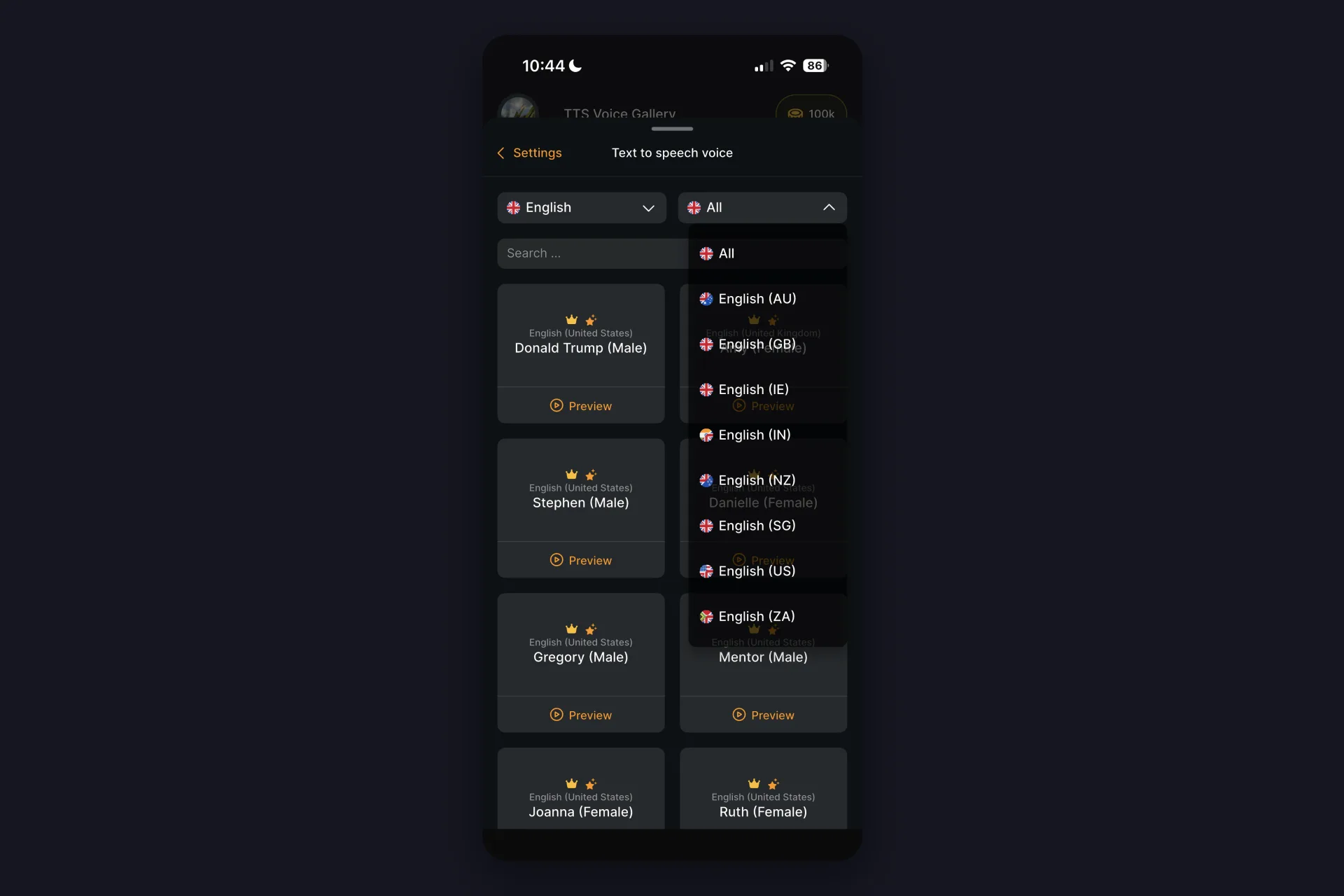
Tap the TTS tab in the bottom bar and the app drops you straight onto Text to speech Chat, exactly where you want to start. Switch on Text-to-Speech, then pick your chat voice from the gallery you just met. Tap Voice Preview to hear it before your viewers do, and set the volume so the voice sits under your own, not over it. Running a standard voice? Nudge speed and pitch until they match your stream’s energy.
Then make two decisions that shape the whole experience:
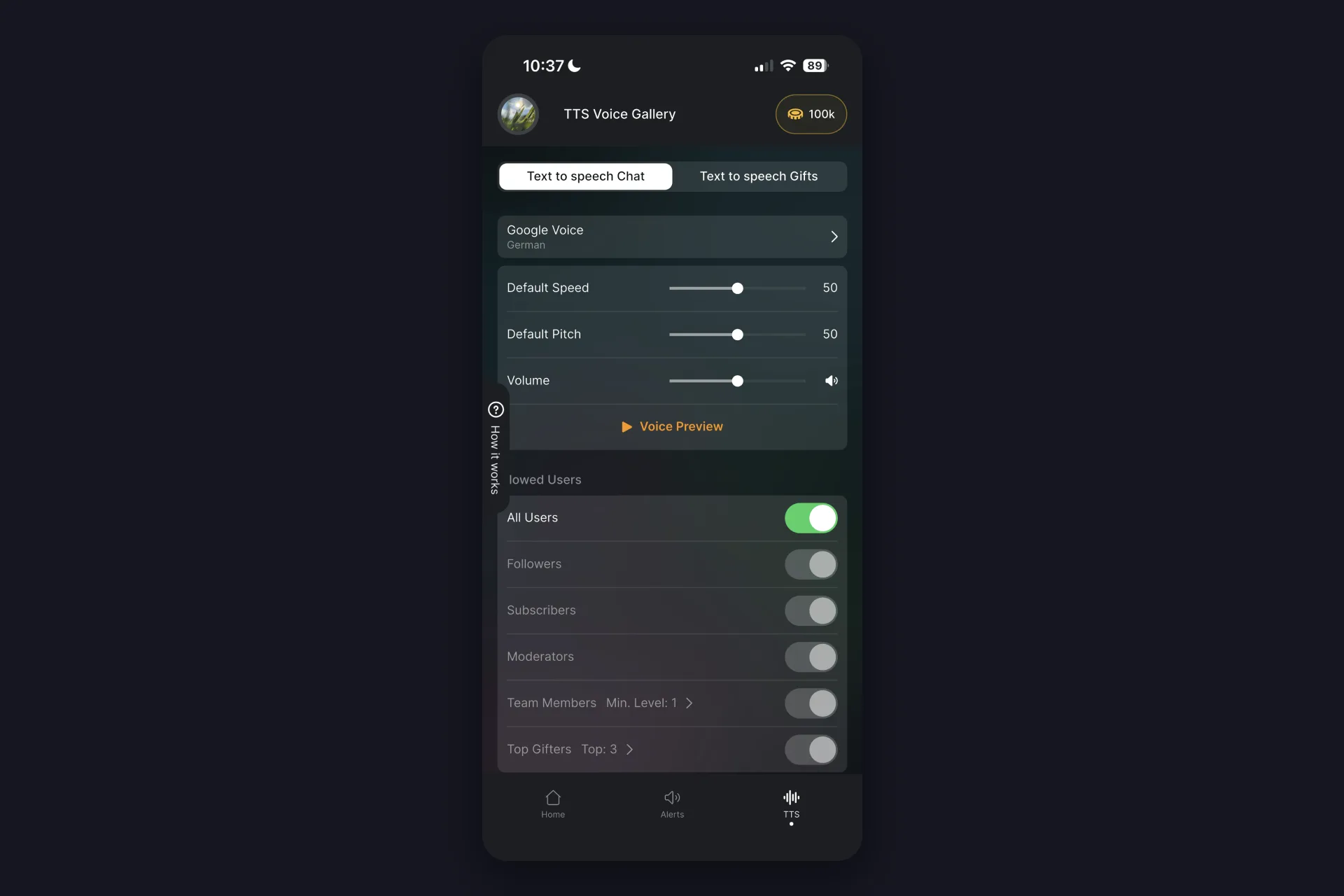
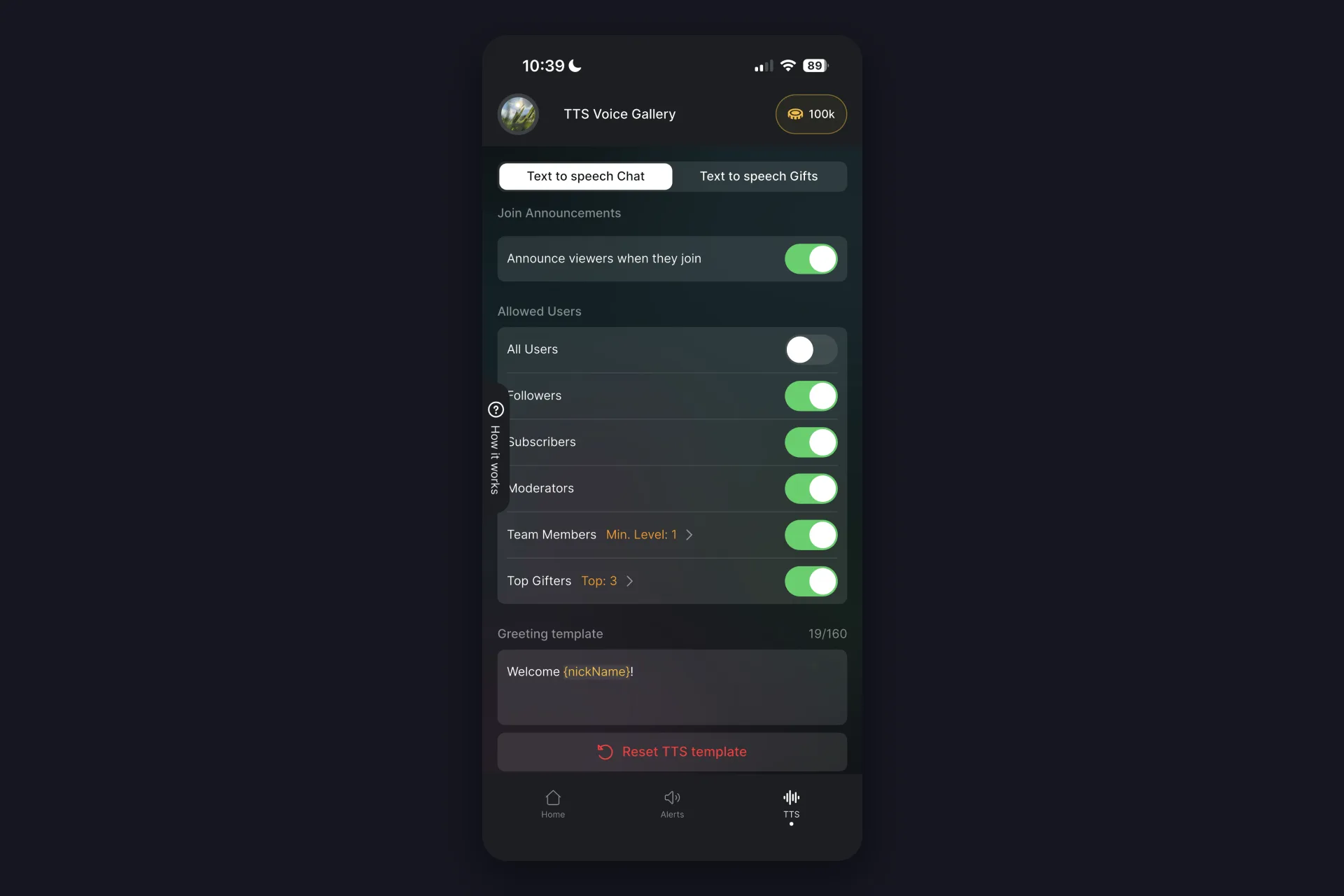
Who gets read. Under Allowed Users you choose whose messages count: everyone, or just followers, subscribers, moderators, team members, or your top gifters. Starting narrow and opening up later is a perfectly good strategy.
What gets read. Command Types decides whether every comment is spoken or only comments starting with a dot or slash. Reading everything feels alive on small streams; on busy streams, commands keep TTS special instead of constant.
The message template is yours to edit too. Placeholders like {nickName} and {comment} decide what the voice says, so it can call out who wrote what, and you can rewrite that line to match your stream’s tone.
Spam protection: keep the voice from melting down
A busy chat can turn TTS into chaos, so TikFinity Mobile ships with guardrails you can tune:
- User cooldown: seconds a viewer must wait before their next message gets read
- Max queue length: how many messages line up before new ones get dropped
- Max comment length: cuts off essays before they start
- Filter Letter Spam: catches keyboard smashing before the voice has to perform it
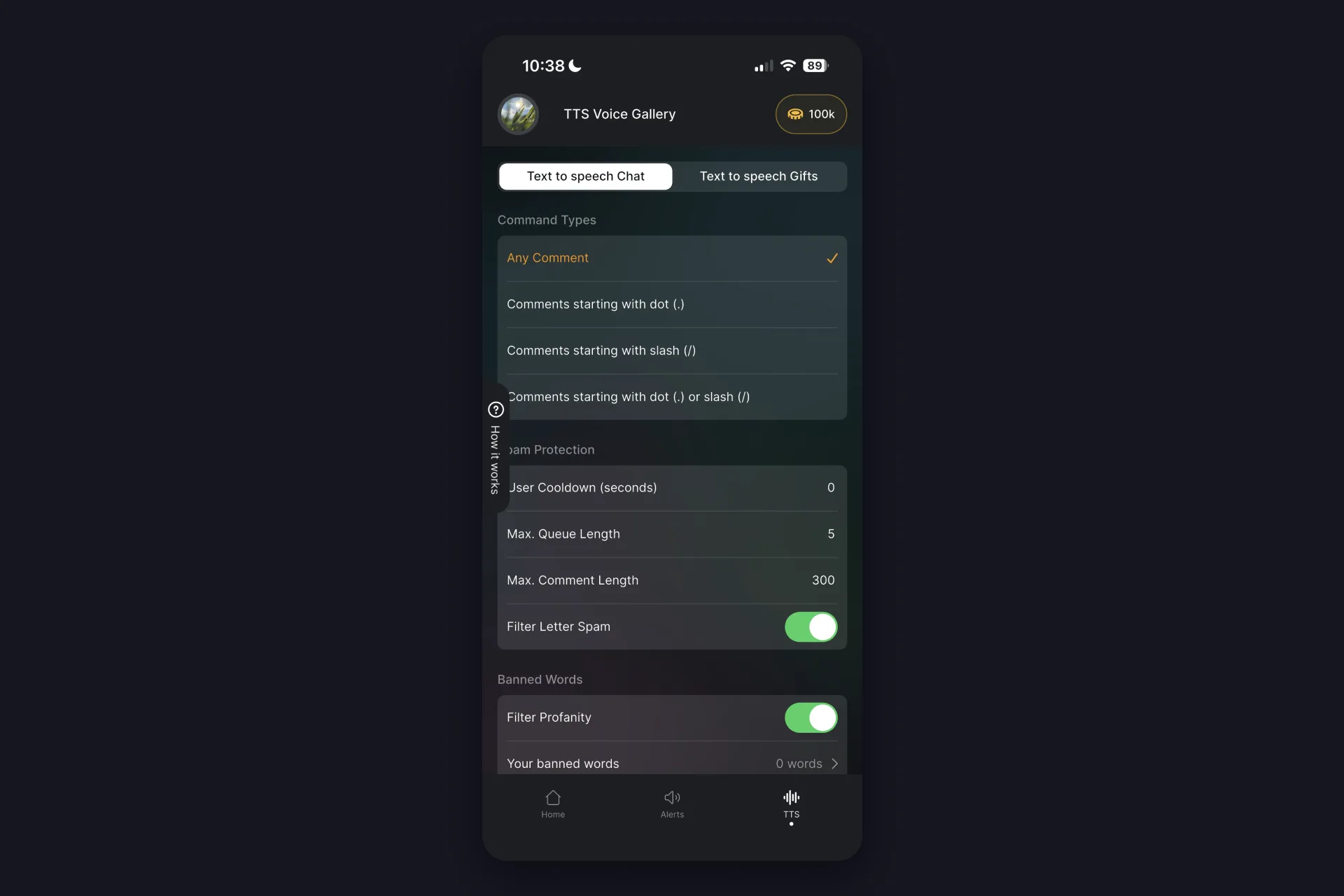
Right below sits Banned Words, your word filter: flip on Filter Profanity and the voice skips the obvious swear words, and you can add your own banned words for everything else you never want spoken on stream. Combine that with the Allowed Users filter and you decide exactly who gets a voice. If trolls still show up, tighten TTS to followers or subscribers for a while, done.
Welcome viewers by name
Inside the TTS Chat settings sits a small feature with outsized charm: Join Announcements. Switch on Announce viewers when they join, and the voice greets people by name the moment they enter your LIVE, using a greeting template like Welcome {nickName}! Every viewer gets welcomed only once per stream, so it never turns into a loop.
Set up TTS Gifts: every gift gets announced
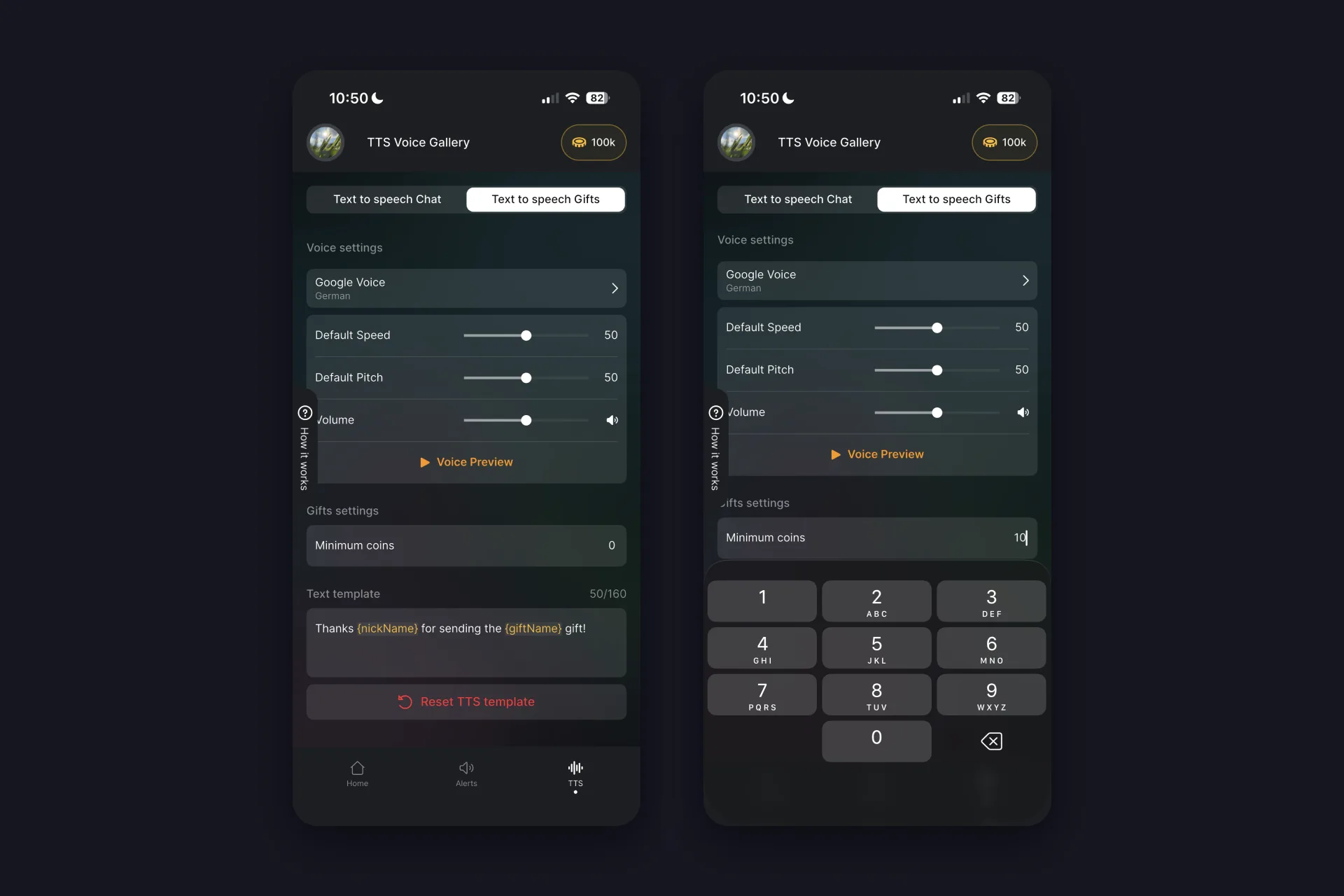
The second tab works the same way but reacts to gifts instead of messages. Pick a voice, and here’s a nice trick: choose a different voice than your chat voice, so everyone instantly hears whether it’s a message or a gift.
Two settings make this tab shine:
Minimum coins. Set a threshold, say 10 coins, and the voice only announces gifts above it. Small gifts still trigger your sound alerts, big gifts get called out by name.
The template. By default it says thanks with the gifter’s name and the gift, placeholders like {nickName} and {giftName} fill themselves in. Rewrite it however you like, your regulars will quote it back at you.
What’s free and what’s Pro?
| What you get | Free | Pro |
|---|---|---|
| TTS messages | 75 per day | Unlimited |
| Standard voices | Included | Included |
| Premium AI voices | Not included | 100,000 credits per month |
If you want to see the pricing, just have a look in the app. And the usual heads-up: the mobile subscription is separate from TikFinity Pro on desktop, neither one unlocks the other.
TTS not working? Run this checklist
✅ Text-To-Speech toggle is on and you hit Start Sound Alerts & Text-To-Speech
✅ You’re live with a public stream, private streams can’t be read
✅ Command Types isn’t set to dot or slash only while your viewers type normal comments
✅ Allowed Users isn’t filtered so tightly that nobody qualifies
✅ You haven’t hit the free plan’s 75 messages for the day
✅ Phone isn’t on silent, volume is up, app is updated
Still silent? The app has a built-in way to contact support, they’ll dig in with you.
Give your chat a voice today
Pick a voice, keep the default template, and go live once with TTS on. You’ll feel the difference in minutes: you stay with your content, and nobody’s message slips past you. That’s the whole promise, and it fits in your pocket.
By the way: TTS isn’t a mobile exclusive. TikFinity has it on desktop too, browser-based and without extra software, so if you stream from a PC, our guide on enabling Text-to-Speech for your TikTok stream walks you through that setup.
FAQs about TTS in TikFinity Mobile
No. The video editor’s voiceover tool narrates recorded clips before you post them. TikFinity Mobile’s TTS works live: it reads chat messages and announces gifts out loud while you’re streaming on TikTok LIVE.
Yes, the free plan includes 75 TTS messages a day with the standard voices. TikFinity Pro removes the daily limit and adds premium AI voices with a monthly credit budget.
Yes, TTS Chat and TTS Gifts are separate tabs with separate voices, volumes, and templates. A different voice for gifts is a neat trick, your viewers hear instantly that something special happened.
The usual suspects: Command Types is set to dot or slash commands while viewers type normal comments, Allowed Users is filtered too tightly, the free plan’s 75 daily messages are used up, or the stream isn’t public. Our troubleshooting checklist in this guide walks through all of them.
Yes. Turn on Join Announcements in the TTS Chat settings and the voice welcomes viewers by name with your greeting template, once per viewer per stream. You can limit greetings to followers, subscribers, moderators, team members, or top gifters.
Yes. Flip on Filter Profanity under Banned Words and the voice skips profanity, and you can add your own banned words list on top. TikTok’s comment moderation also catches a lot before it reaches TTS, and the Allowed Users filter decides who gets a voice on your stream at all.