Picture the viewer who’s in every LIVE you do. One night they tap Join next to your name, open the Super Fan tab, and pay for the extras: the badge next to their name, the Super Fan-only LIVE on Sunday, first pick when you open the multi-guest slots. A TikTok subscription is that moment, repeated every month, and it’s TikTok’s own way of giving creators a predictable monthly reward.
Then you open TikTok Studio, tap Subscription, and get a checklist: two green check marks, two grey x’s, and a Join button that won’t light up. That’s how most creators meet the program for the first time, and it’s only half the story. Since September 15, 2025, there are two monetization programs: one next to your videos in TikTok Studio, one inside your Fan Club that only exists on TikTok LIVE. Different rules, different prices, different payouts. If you stream, the second one is yours, and it’s where most of this guide lives.
We went through TikTok’s own Creator Academy, Help Center, and the subscription agreement so you don’t have to, tested it ourselves, and put it all in one place so you know exactly what’s waiting for you. Every number below comes from TikTok’s own pages, linked in each section and current as of September 2026, because these things change and nobody should plan a month around a figure from an old Reddit thread.
Two programs, one word
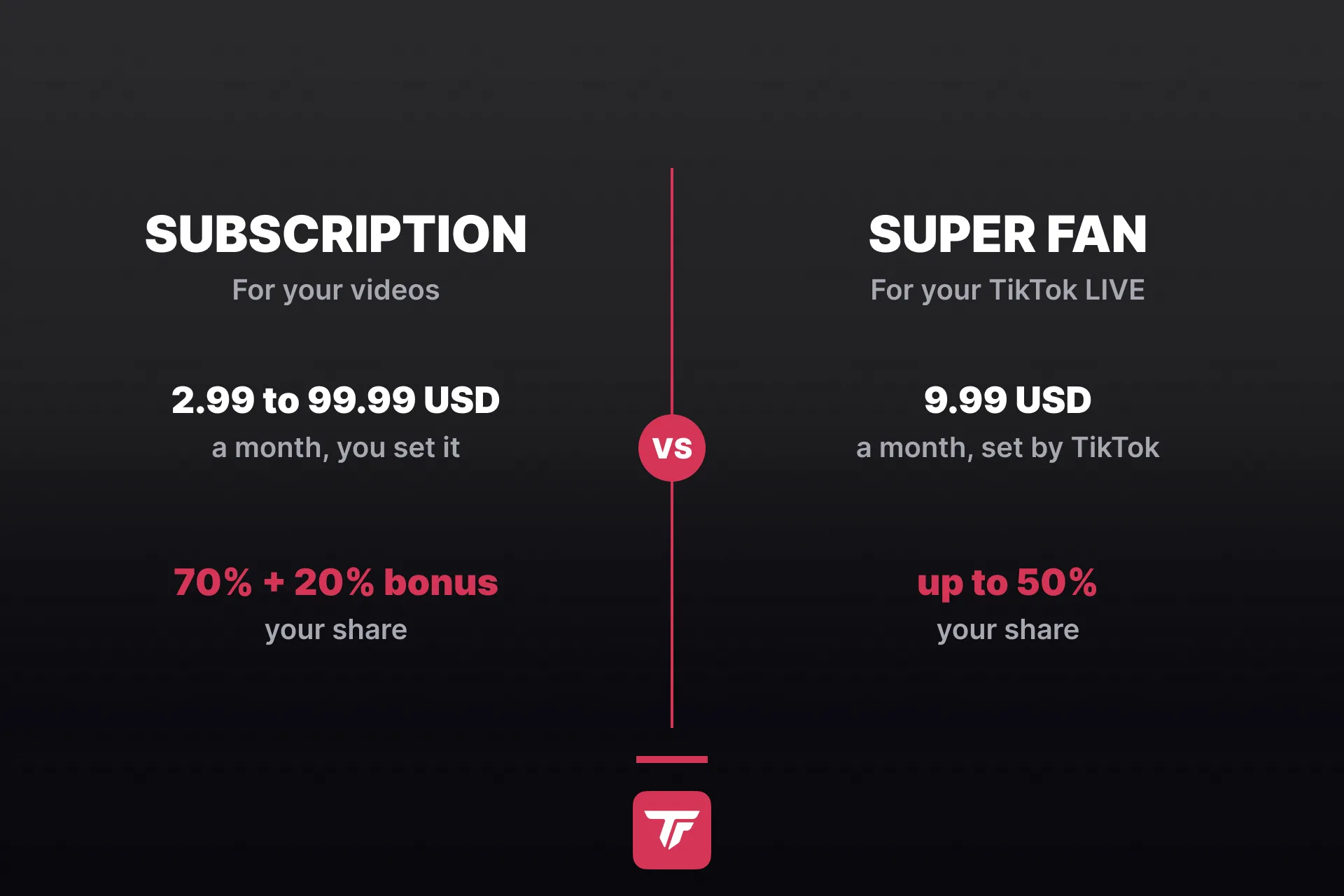
Until 2025, TikTok ran one LIVE subscription for everyone. Then it split the thing in two. Subscription became the offer for creators who mostly post videos, and Super Fan took over everything LIVE. TikTok’s own comparison keeps it simple: mostly pre-recorded content, go with Subscription. Mostly LIVE, go with Super Fan. You can run both.
| Subscription | Super Fan | |
|---|---|---|
| Built for | Your videos, posts, and stories | Your TikTok LIVE streams |
| Where it lives | TikTok Studio, Monetization tab | LIVE Center, inside your Fan Club |
| What fans pay | You set it, 2.99 to 99.99 USD a month | 9.99 USD a month, set by TikTok |
| What fans get | Sub-only posts and stories, a sub-only space, a badge in comments, custom stickers, your own perks | Permanent fan badge, special gifts, Super Fan-only LIVEs and chat, a fan space |
| Your share | 70% after app store fees, up to 90% with the bonus | Up to 50% after payment fees |
| To get in | 18+, 10,000 followers, 100,000 video views last month | LIVE access, your Fan Club is on by default |
If you only stream, skip straight to Super Fan. Not sure which camp you’re in? Read both, it’s five minutes.
Subscription: the program for your videos
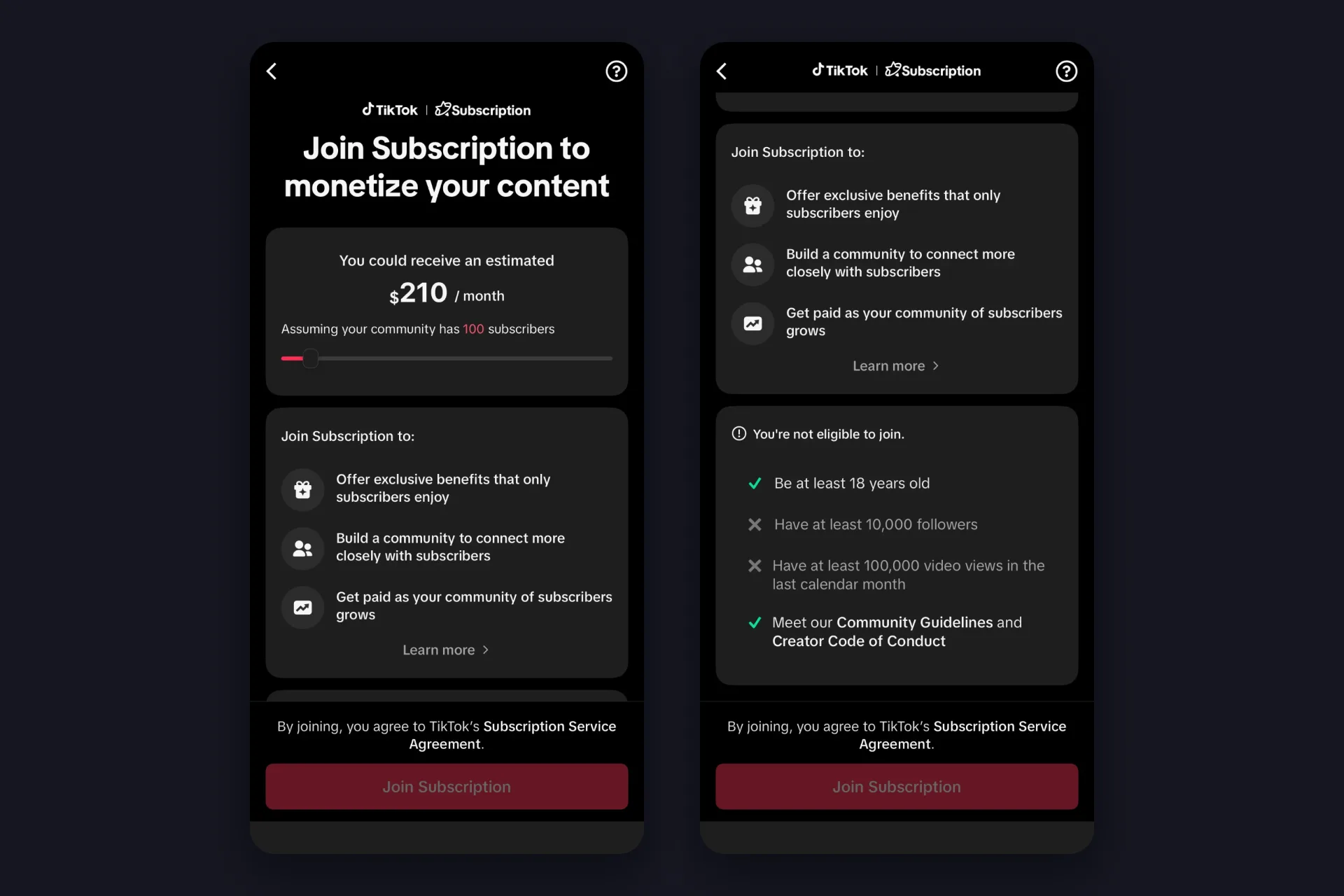
This is the one most people mean when they google TikTok subscriptions, and it’s built for the feed: subscriber-only videos and notes, a badge next to their name when they comment, custom stickers, and perks you invent yourself, according to TikTok’s Getting started with Subscription.
The TikTok subscription requirements are the part to check first, and TikTok makes that easy. Open the join screen and you get a checklist with a check mark or an x next to each line: at least 18 years old, at least 10,000 followers, at least 100,000 video views in the last calendar month, and a clean record with the Community Guidelines and Creator Code of Conduct. We opened it on a small account and got two green checks and two grey x’s. The Join button stays grey until all four are green.
✅ Find it: Profile, Menu, TikTok Studio, then the Monetization tab. Scroll to Monetization programs and tap Subscription.
✅ Join Subscription: once you’re in, a Subscribe button appears under your bio on its own.
✅ Set your price: the default is 5.99 USD, you can pick anything from 2.99 to 99.99 USD a month. Fans pay in their local currency, and the join screen shows a slider with TikTok’s own estimate for a given subscriber count. A ballpark, not a promise.
✅ Pick your perks: from TikTok’s list or your own, and change them later from the Subscription page under your bio.
What you keep: TikTok’s Creator Academy says 70% of the revenue after app store fees, and creators who post at least three subscriber-only videos a month can add a 20% bonus, which takes the share to 90%. Two rules from the Subscription Service Agreement are easy to miss: subscriber-only videos can’t be duets or stitches, and they may only use royalty-free sounds. And there’s a catch in that agreement about the percentage, which we get to in the FAQ.
Super Fan: the TikTok LIVE subscription
If you stream on TikTok, this is your section, and it’s the reason this guide exists. Super Fan is a paid status inside your Fan Club, TikTok’s built-in community for LIVE creators.
Fan Club first, Super Fan on top
The Fan Club itself has no monthly fee: viewers join once by sending a Heart Me gift in your LIVE, that’s one Coin, and there’s nothing to pay after that. From there they level up by watching, commenting, and gifting, from level 1 to level 50, collecting badges at the milestones along the way. TikTok’s Fan Club guide explains the levels and the Popular ranking that comes with them.
One line from TikTok’s in-app FAQ to keep in mind: Fan Club is available in selected countries and regions.
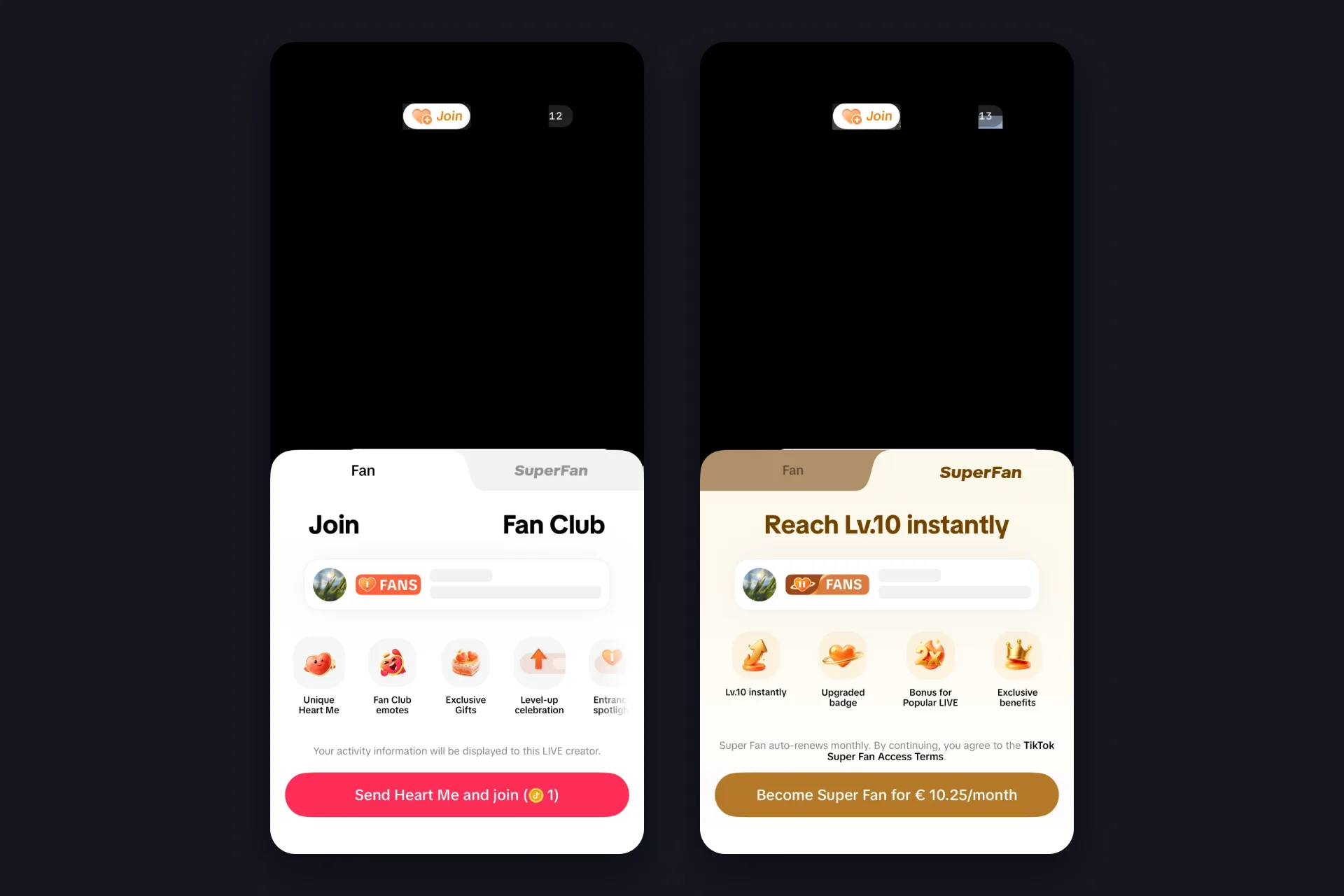
Super Fan sits on top of that. For 9.99 USD a month, or the equivalent in local currency, a viewer upgrades their Fan Club status on the spot, and a brand-new fan starts at level 10 instead of one. On our German test account the app shows the Super Fan price as EUR 10.25 a month, so expect your local number to look a little different.
What a Super Fan gets
From the viewer’s side it’s two taps, no Heart Me needed first: Join next to your name opens the Fan Club sheet with a Fan tab and a Super Fan tab. The Super Fan tab sells the upgrade with “Reach Lv.10 instantly” and a Become Super Fan button in local currency. The payment runs through the app store, Apple lists it as LIVE Super Fan.
TikTok’s Super Fan FAQ sorts the benefits into three buckets: a permanent fan badge with automatic Fan Club membership, special gifts plus whatever exclusive LIVEs and chats you choose to offer, and faster level-ups with double points on the Go Popular gift. In plain terms: your Super Fans get seen, and they push you up the LIVE ranking while doing it. Level 10 on its own doesn’t make anyone a Super Fan: levels are earned with points, Super Fan only comes with the subscription.
If a Super Fan stops paying, they lose those extras but keep their Fan Club level and points, so nobody drops out of your community.
Your Super Fan tools in LIVE Center
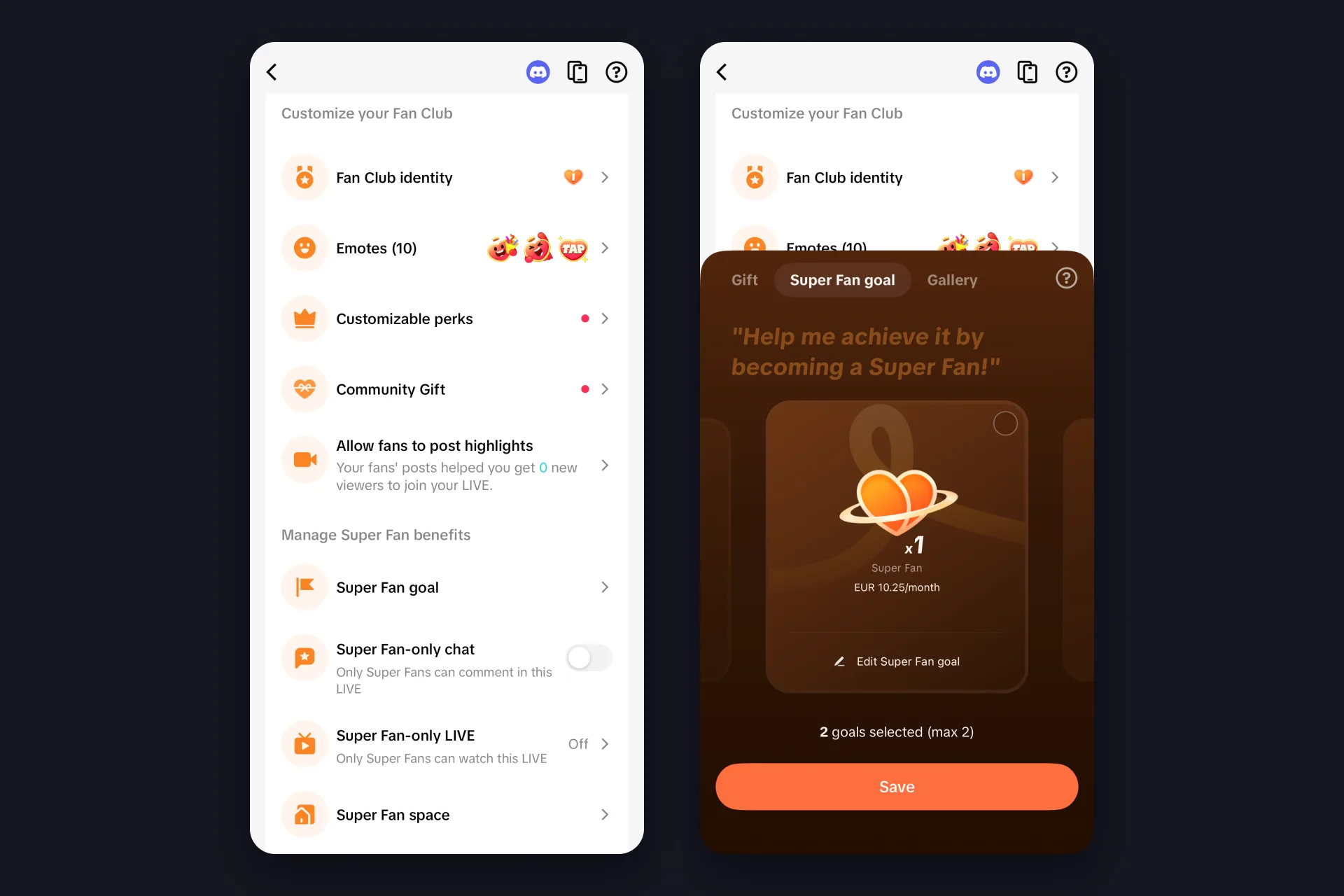
What you offer them is up to you, and it all sits in one place: LIVE Center, Fan Club, then the Fan Club tools tab. The top of that list customizes the club for everyone, the section called Manage Super Fan benefits is where the paid extras live:
✅ Super Fan goal: a target for new Super Fans during your LIVE, shown next to your gift goals. You can run two goals at a time, and each one expires after four hours. “Karaoke at five Super Fans” is the kind of thing that works.
✅ Super Fan-only chat: a toggle that reads “Only Super Fans can comment in this LIVE”. A quiet chat for a Q&A, on demand.
✅ Super Fan-only LIVE: “Only Super Fans can watch this LIVE”, with an optional 60-second preview for everyone else. Careful, once you switch a running LIVE you can’t switch back without restarting it.
✅ Super Fan space: a page for threads, polls, and topics with your paying fans, between streams. Everyone else sees the topics but not the threads, which is the point.
✅ Super Fan emotes: up to 60 emotes only Super Fans can use in your chat, next to 15 for all fans and a few milestone emotes TikTok hands out on its own. You upload your own, TikTok’s sticker guidelines apply.
✅ Custom perks: up to seven, each with a minimum fan level, from “Suggest LIVE topic” to priority in multi-guest requests, priority DMs, pinned comments, shoutouts, and mini-games.
What you keep, and who can offer it
What you keep: TikTok rewards you with up to 50% of its Super Fan revenue after payment processing fees, and says the exact amount depends on things like your subscriber count. You can see it under Balance, Estimated balance, or in LIVE Center under Fan Club, Super Fan rewards, split by this month and last month, with a seven-day chart of new Super Fans. And here’s the good news for smaller creators: TikTok’s Super Fan pages list no follower threshold, and we checked. On a test account with around 1,000 followers and no fans yet, the Super Fan tab showed up for viewers the moment we went LIVE. What you need is LIVE access and your Fan Club, which TikTok turns on by default. The tools are in your app before the first fan arrives, so you can set the perks, the emotes, and the goal, then go LIVE.
Make every new subscriber visible on stream
Here’s the thing about a new Super Fan: TikTok celebrates them in the app, with the badge and the entrance effect. Your stream doesn’t, unless you set it up. And the stream is what your clips are cut from and what makes the next viewer think “I want that too”. That’s the part TikFinity handles, for free, in about the time it takes to read this section:
1 An alert for every subscribe. In Actions & Events, pick the Subscribe event as the trigger and attach an action. A GIF, a sound, and an on-screen “Thanks for subscribing!” is the classic combo, and the event simulator has a Subscribe / Super Fan button so you can test it before anyone pays. Our alerts guide walks through the setup.
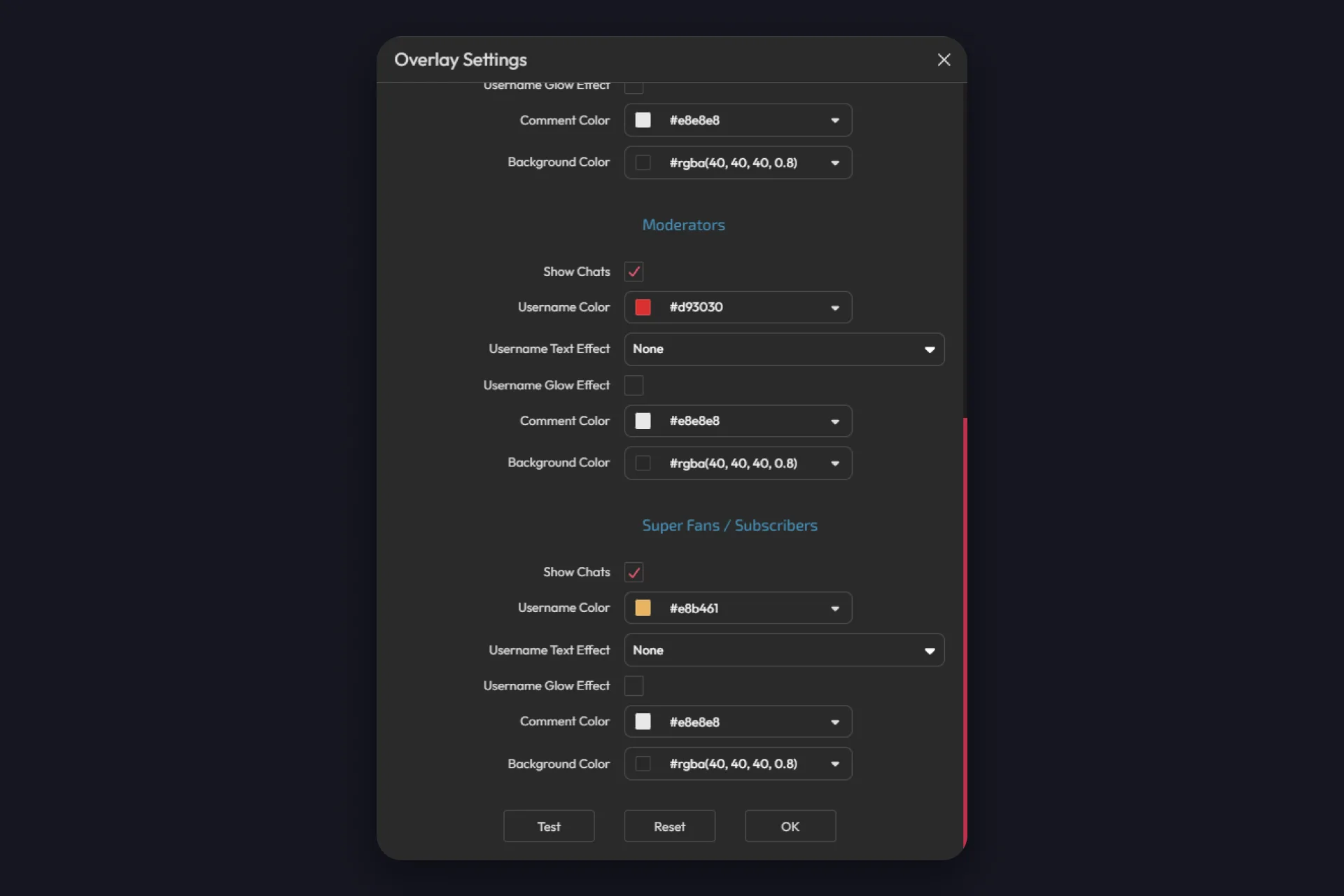
2 Their own color in the chat. The Chat overlay has a Super Fans / Subscribers group with its own username, comment, and background color, so their messages stand out in the stream and in every clip. The chat overlay guide shows where that setting sits.
3 A goal and a name on screen. The Goal overlays include a New Subscribers goal that counts Super Fans and Subscribers alike, filling up as people upgrade, and the Last X overlays put your latest subscriber’s name and picture on stream until the next one lands.
4 Perks that cost you nothing. Text-to-speech can be limited to subscribers, so their comments get read out loud while everyone else types. Chat commands can be subscriber-only too, your Super Fan emotes work as triggers for sound alerts and actions (TikFinity lists them as Super Fan Stickers, separate from the Fan Club Stickers), and the Emojify overlay slides them across the screen whenever a Super Fan drops one in the chat.
Not sure which widgets earn their spot on stream? The TikFinity team ranked them in under a minute:
@tikfinity.official These are some S tier ways to increase the interactions on your livestream, with TikFinity 😎 #TikFinity #Tutorial #Tier
♬ som original – TikFinity – TikFinity
Put those four in your Super Fan custom benefits and the upgrade starts selling itself: a badge from TikTok, plus a voice, a color, and a goal bar on your stream from you.
Set up the one that matches your content
Posting videos every day and sitting above 10,000 followers? Join Subscription in TikTok Studio. Streaming most nights? Set up your Super Fan perks in LIVE Center as soon as they show up for you. Doing both? Run both, and name the perks clearly. Then give your subscribers a moment on stream, so the next viewer sees what they’re missing.
Alert Your New Subscribers, Free →
Subscriptions are one piece of LIVE income next to gifts and Diamonds. Our guide to making money on TikTok LIVE puts them side by side.
FAQs about TikTok subscriptions
It depends on which one. A Subscription to a video creator costs whatever that creator set, between 2.99 and 99.99 USD a month, with 5.99 USD as TikTok’s default. Super Fan, the LIVE subscription, is 9.99 USD a month worldwide, or the equivalent in your currency. Both usually renew monthly through your app store, and app store taxes and exchange rates can move the final number. That’s the state of play in September 2026, and TikTok can change it at any time.
For a video creator, open their profile and tap the Subscribe button under the bio, then pick the plan and confirm the payment through your app store. For a LIVE creator, tap Join next to their name in the LIVE, switch to the Super Fan tab, and confirm the purchase through your app store. If a creator has no Subscribe button and no Fan Club, they haven’t joined either program yet.
Because you’re not following that creator yet. In a LIVE, the button next to the creator’s name is Follow first. Once you follow, it turns into Join, and that’s where the Fan Club sheet with the Super Fan tab lives. We tripped over this ourselves: no Join badge on a creator’s LIVE usually means no follow yet, not no Fan Club. If Join still doesn’t show up after you follow, that creator’s Fan Club probably isn’t available in your region, TikTok only says it’s limited to selected countries.
Both Subscription and Super Fan normally renew automatically every month until you cancel, and both are billed through the Apple App Store or Google Play. So you cancel them where you manage every other app subscription, in your App Store or Google Play subscription settings, not inside the creator’s profile. TikTok shows up there like any other app subscription, and Apple’s purchase sheet asks you to cancel at least a day before the renewal date.
Subscription: Profile, Menu, TikTok Studio, Monetization tab, then Subscription and Join Subscription once all four eligibility checks are green. Super Fan comes with your Fan Club: open LIVE Center, Fan Club, and the Fan Club tools tab, give the club a badge name and a Fan Club name, then set your paid extras under Manage Super Fan benefits. Once your Fan Club exists, viewers who tap Join next to your name see a Fan tab and a Super Fan tab.
Subscription tells you on the join screen: every requirement gets a check mark or an x, and the Join button stays grey until you’re 18 or older, have 10,000 followers and 100,000 video views in the last calendar month, and have a clean record with the Community Guidelines. Super Fan is different: TikTok publishes no requirements for it and doesn’t say why. What we can tell you is that it worked on our test account with around 1,000 followers and no fans yet. So once you have LIVE access, which starts at 1,000 followers, open LIVE Center and look for Fan Club and Manage Super Fan benefits. If they’re there, you’re in. The one limit TikTok names is regional, its in-app FAQ says Fan Club is available in selected countries and regions. Our TikTok LIVE requirements guide covers the LIVE access part.
Both numbers are TikTok’s, from two different documents. The Creator Academy pages, updated in August 2026, say Subscription creators receive 70% of the revenue after app store fees, plus a possible 20% bonus for posting at least three subscriber-only videos a month, so up to 90%. The Subscription Service Agreement, last updated in March 2024, still describes a 50% service fee on the net proceeds. For Super Fan, TikTok says up to 50% after payment fees. Our read: the Academy reflects the current program, the agreement text is the older of the two, and the estimate slider in the app is the number that applies to your account today. If the two ever disagree for you, the agreement is the document you signed, so ask TikTok support before you plan around the higher figure.