Your regulars tap more than anyone, and the only thing TikTok shows for it is a number in the corner. The Top Liker overlay from TikFinity turns that number into a ranking: the viewers who sent the most likes, with a crown for first place and a medal for the top three. This guide shows how to add a TikTok top liker ranking to your stream, how to make it fit your layout, and how to pair it with goals so the hearts keep coming.
What the Top Liker overlay puts on screen
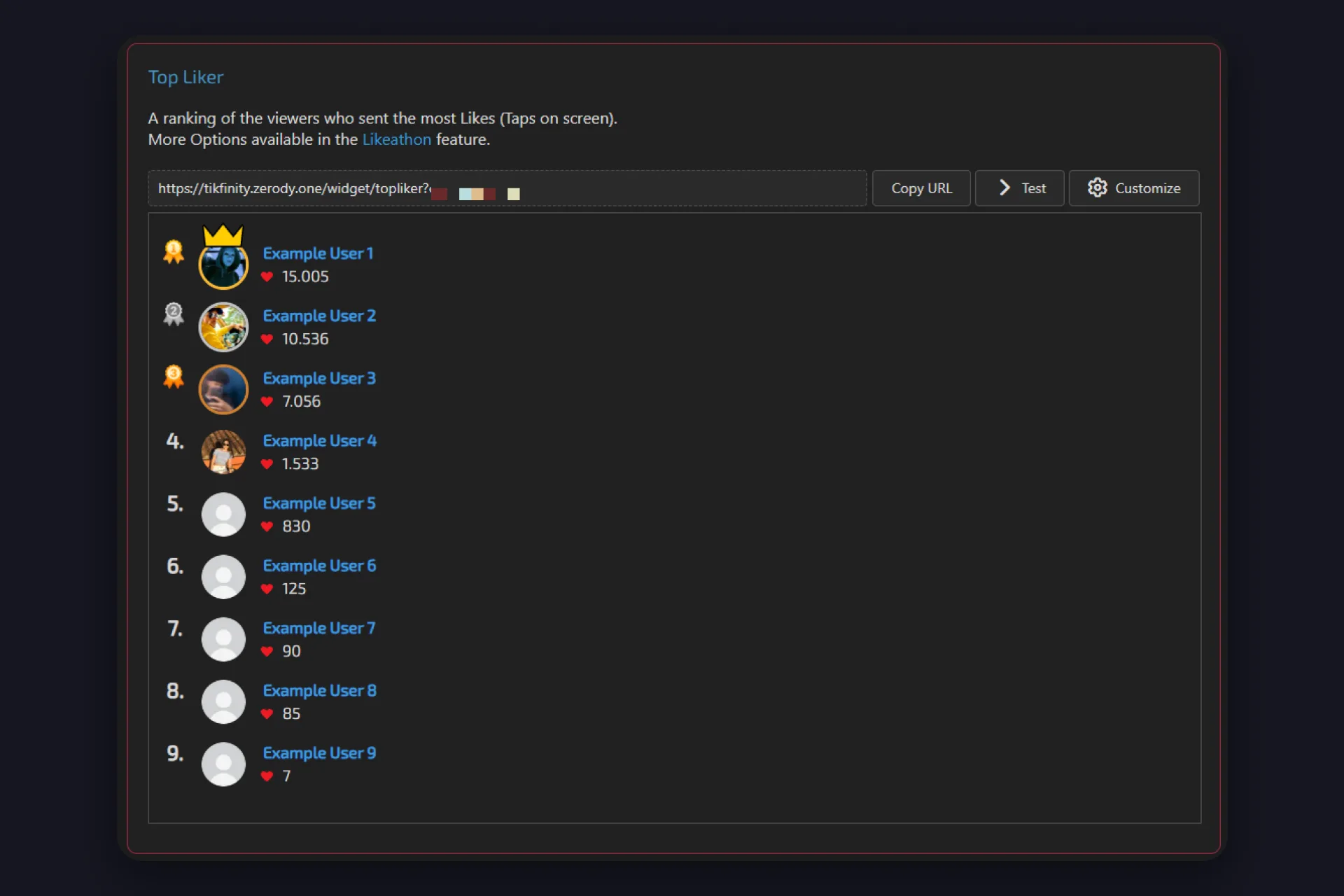
It’s a ranking of the viewers who sent the most likes in your LIVE, taps on screen counted per person. First place gets a crown and a gold medal, second and third get silver and bronze, and everyone below that gets a plain rank number. Next to each name sits a heart and the like count, so your viewers can see exactly how far they are from the spot above them.
It’s a free widget in TikFinity’s overlay gallery, and it asks nothing of your viewers except what they already do: double tap the screen. The names come from the people in your LIVE, the numbers update while they tap, and the crown moves the moment someone overtakes. If you want the full picture of how hearts work in a LIVE, our guide to liking a TikTok LIVE has it.
Set it up in three steps
1 Open TikFinity, log in, and make sure your TikTok @username is connected. If you’re new here, the setup guide covers that part in a few minutes.
2 Go to Overlays, find the Top Liker card and click Copy URL.
3 Paste it into your broadcasting tool. In OBS Studio that’s Sources, the plus button, Browser, and the link goes in the URL field. In TikTok LIVE Studio it’s Add source, Link, paste. Streamlabs works like OBS.
Hit Test on the card and the overlay fills with example users, so you can place and size it before anyone is watching. Once you go LIVE, TikFinity connects to your stream and the ranking starts counting from the first tap.
Make it match your layout
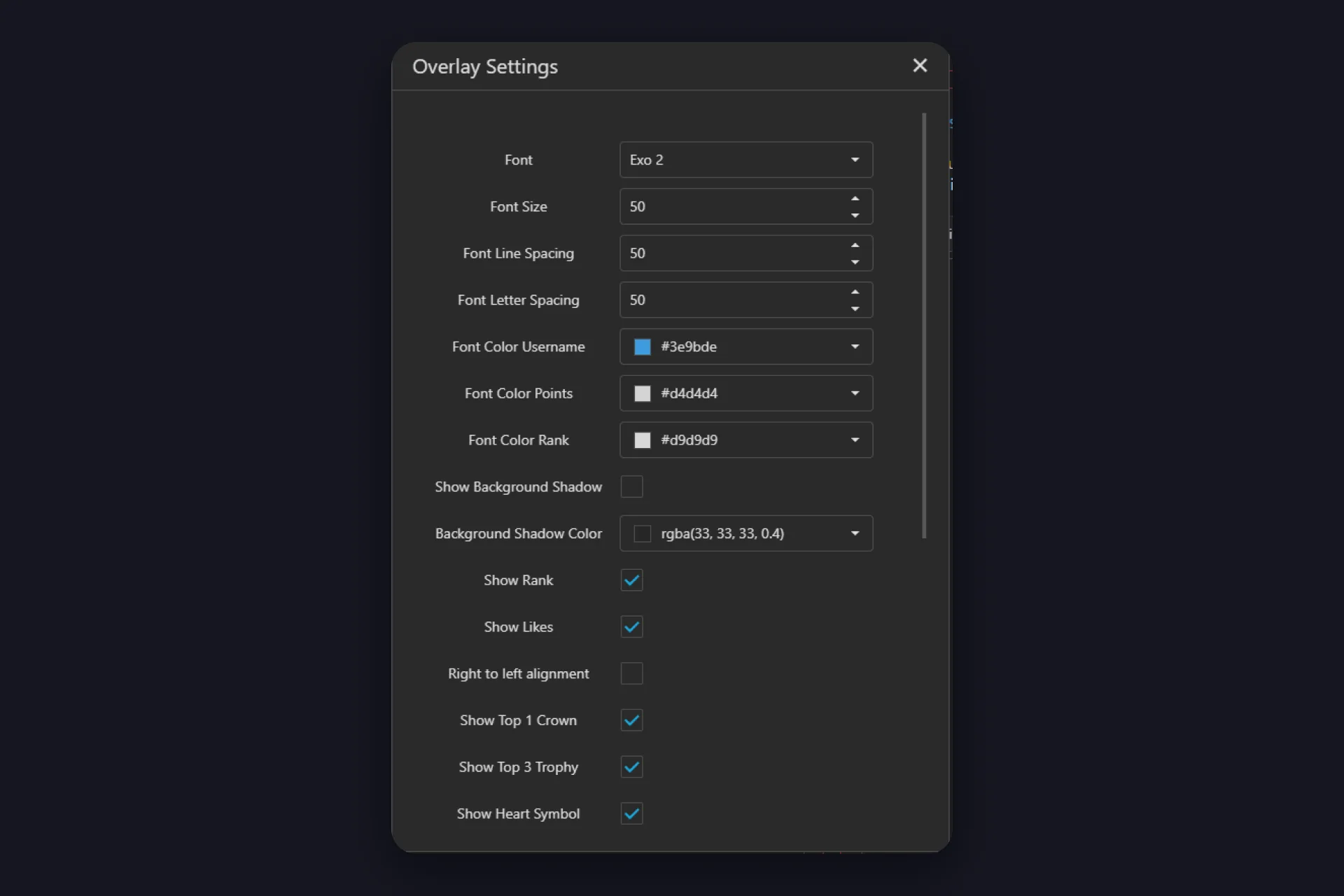
Customize opens the Overlay Settings. The field labels are in English in every app language, so here’s what the ones you’ll actually touch do:
| Setting | What it does |
|---|---|
| Font, Font Size, Line Spacing, Letter Spacing | Fits the list to your scene. Smaller font, more names in the same space. |
| Font Color Username, Points, Rank | Three separate colors for the name, the like count and the rank number. |
| Show Rank, Show Likes | Hide the numbers if you only want names on screen. |
| Show Top 1 Crown, Show Top 3 Trophy | The crown for first place and the medals for the top three, each on its own switch. |
| Show Heart Symbol, Animate Heart Symbol | The heart next to the count, still or pulsing. |
| Right to left alignment | Flips the layout for a list on the right edge of your stream. |
| Text Effects, Font Border, Background Shadow | Readability over busy game footage: a wave animation on the names, an outline, or a soft shade behind the list. |
Test inside the dialog shows the result, OK saves it. The URL doesn’t change, so you don’t need to add the source again.
Give them a reason to keep tapping
A ranking tells your viewers who’s ahead. A goal tells them what the taps are for. Together they do what neither does alone: the regulars fight for the crown, and everyone else pushes the number toward a target they can actually reach.
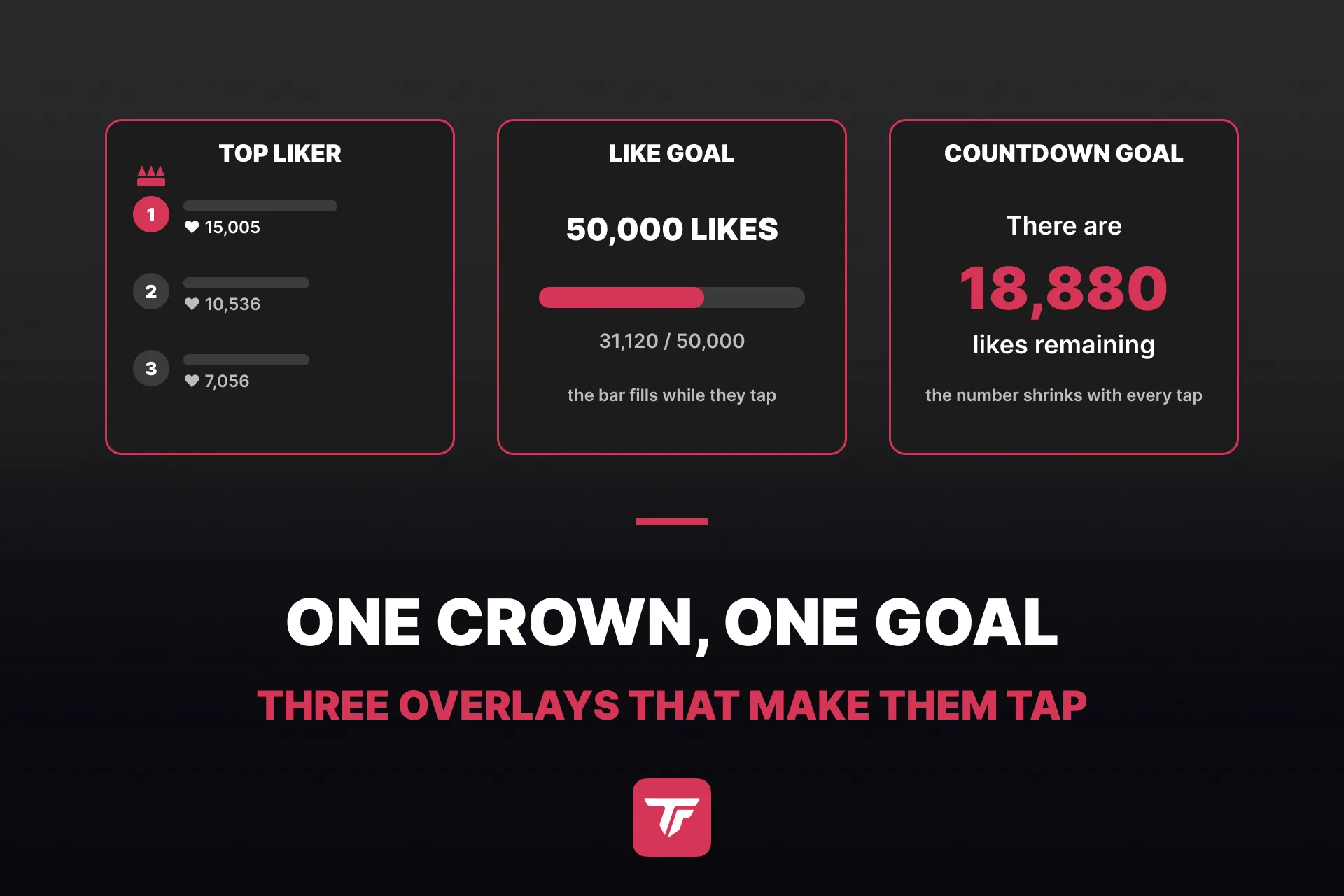
The like goal on the goals page is the classic. You set a target, give it a title, and a bar shows the progress on stream. Our likes guide walks through it, including what to promise when the bar fills up. TikFinity’s own one-minute tutorial on TikTok shows the goal setup on PC.
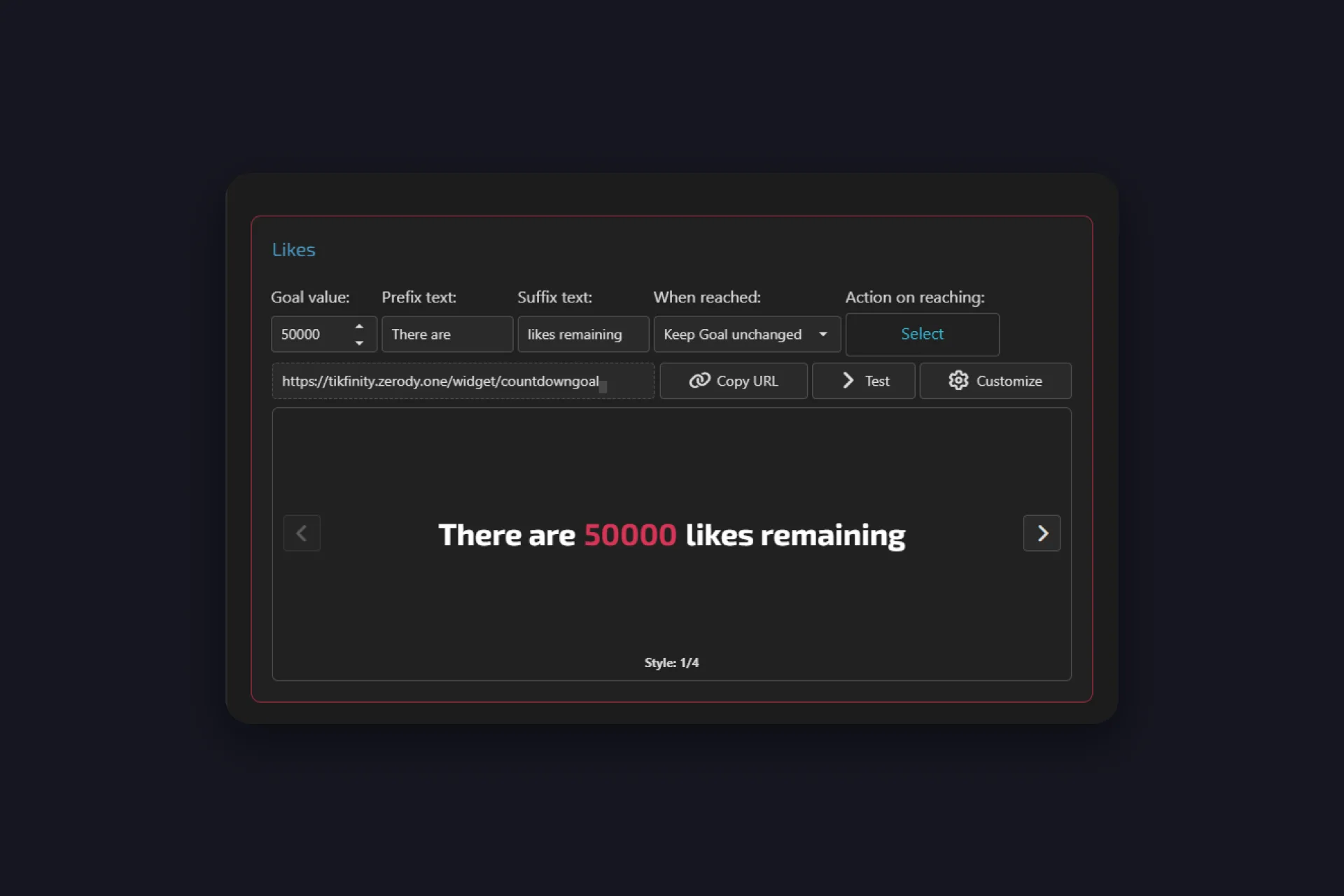
The countdown goal turns the same target around. Instead of a bar filling up, it shows a sentence with the number that’s left, “There are 50000 likes remaining”, and the number shrinks with every tap. On the countdown goals page you set the goal value, the prefix and suffix text, what the goal does once it’s reached, and an action for that moment, such as an alert. Four styles to flip through, and the value has its own color, so the number can sit in your brand color while the words stay white.
Here’s the setup that works on stream:
✅ Top Liker along one edge. Names, crown, medals. That’s the who.
✅ One goal where everyone sees it. Like goal or countdown, not both. That’s the how far.
✅ One reward, named before the ask. “Hit the number and I’ll do the thing” beats “please like” every time.
✅ Say it again every few minutes. The people watching now weren’t there ten minutes ago.
Name the top three out loud when the ranking moves. A viewer who hears their name in second place taps for first, and the viewer in fourth suddenly has a reason to care. Something like: “Top three on the board, you know who you are. Whoever’s in fourth, you’re a few hundred taps from a medal.”
Keep the crown moving
After an hour, a ranking can freeze: the same three names on top, everyone else out of reach. The Likeathon page fixes that. It’s the control page for the same Top Liker overlay, same URL, same look, with one switch on top: automatic reduction. Switch it on and every score loses a share every 10 seconds, 10 percent by default, the intensity slider sets how much. Nobody can bank a lead and walk away. The viewer still tapping overtakes the one who sent 5,000 hearts an hour ago, and the crown changes hands all stream long. A Reset List button on the same page wipes the ranking when you want to start over. This short video shows it in action:
@tikfinity.official Follow this tutorial so you can add the Likeathon widget to your TikTok LIVE, with TikFinity! 👏 #TikFinity #Tutorial #Likeathon
♬ som original – TikFinity – TikFinity
Real taps only
Search “topliker tiktok” or “top liker tiktok” and you’ll also find sites and apps that promise free likes. That’s artificial engagement, not viewers in your LIVE. TikTok’s Community Guidelines don’t allow services that artificially boost engagement, and the risk sits on your account, not the seller’s. The overlay in this guide counts the viewers who are actually in your LIVE and actually tapping. That’s the only kind of top liker worth having on screen.
Start with the crown
Add the ranking first, go LIVE, and watch what happens the first time you read out the name in first place. Then put a goal under it and give the crown something to chase.
Add A Top Liker Ranking, Free →
Want something smaller first? The last liker overlay shows whoever tapped most recently, one name at a time. And if you’d rather start with the goal, the like goal is ready on the goals page in about a minute.
FAQs about the TikTok top liker overlay
The viewer who sent the most likes during a LIVE. TikTok itself only shows the total like count, so a top liker ranking comes from an overlay such as TikFinity’s, which counts the taps per viewer and lists the leaders on your stream.
Not inside TikTok, which shows the count but no names. The Top Liker overlay puts the viewers with the most likes on screen, and the last liker overlay shows whoever tapped most recently.
LIVE Studio has a viewer ranking widget, but TikTok’s own guide describes it around gifts, the viewers who send the most. For a ranking by likes, add the TikFinity Top Liker overlay to LIVE Studio as a link source.
Yes, with a crop in your broadcasting tool. In OBS Studio, right-click the Top Liker source, open Transform and Edit Transform, and raise the Bottom value under Crop until only three rows are left. Holding Alt while you pull the bottom edge does the same by hand. Scaling the source instead would squash the list, so crop, don’t resize.
Yes, by hand. The Reset List button sits on the Likeathon page in TikFinity, and one click wipes every score. Use it right before you go LIVE, or mid-stream when you want a second round where your newcomers start level with the regulars.
Yes. Both the like goal and the countdown goal let you choose what happens when the target is hit, such as an action from Actions & Events, so the alert fires the moment your viewers get there.
No. Those sites promise likes for videos, and TikTok’s Community Guidelines don’t allow services that artificially boost engagement. The Top Liker overlay only counts likes sent during your LIVE. Likes on videos never show up there.